


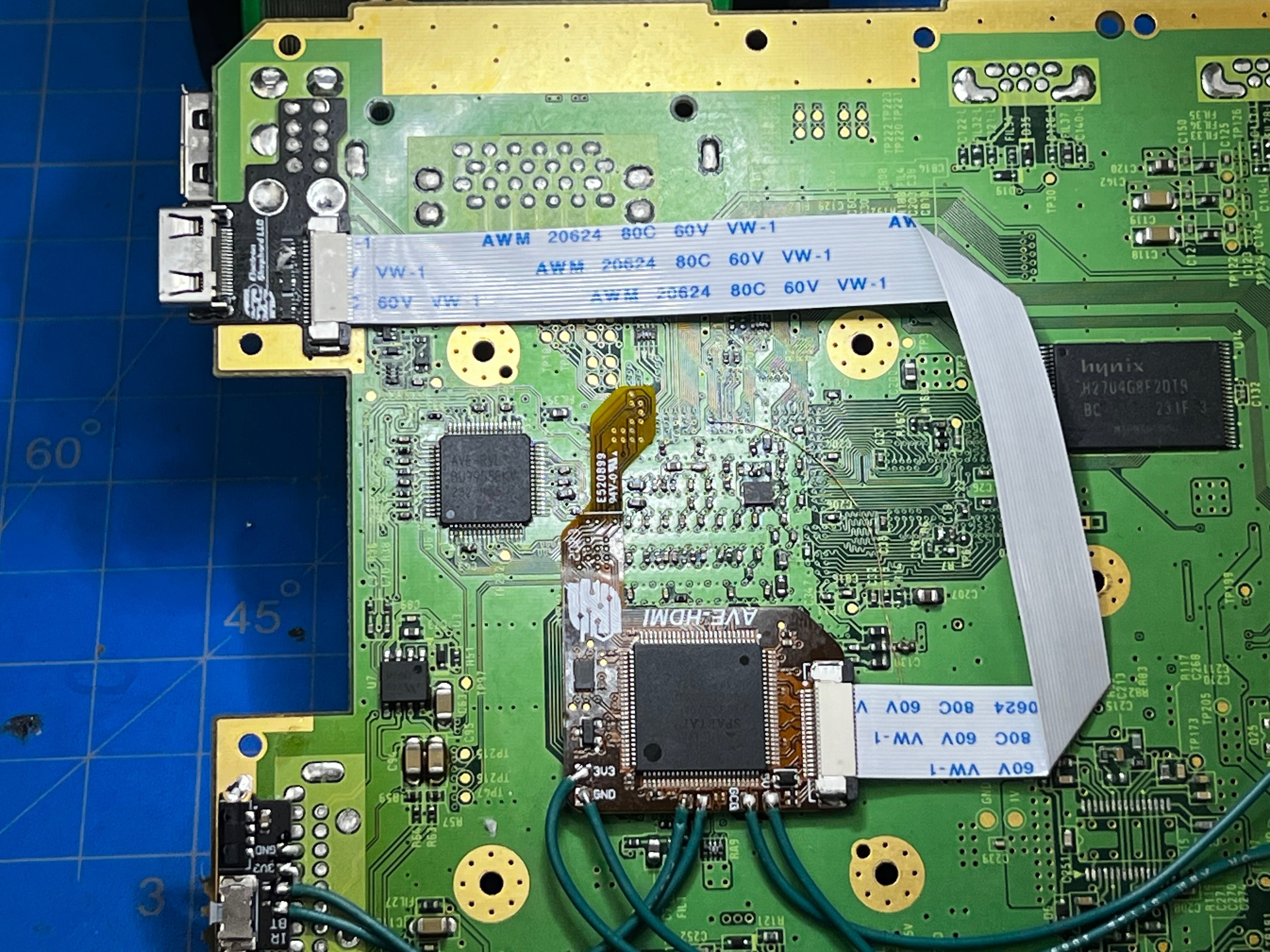
There are two meaningfully different ways to get HDMI output from a Nintendo Wii. The external adapter route is well-known - plug something into the back of the console and connect an HDMI cable. The internal modification route is less discussed but technically superior: a mod board soldered directly to the Wii's motherboard that outputs true digital HDMI without any analog conversion step.
The difference between them is real. So is the difference in what each one requires. Here's how to decide.
Where Each Approach Sits in the Signal Chain
The Wii generates video digitally inside its GPU, then passes that signal through an analog encoder chip before it reaches the AV Multi Out port. Any external adapter converts that analog signal back to digital for HDMI output.
An external adapter like the ElectronWarp works at the AV Multi Out port. It accepts the Wii's component video output (YPbPr), converts it to HDMI, and sends it to your TV. Plug-and-play, no tools needed.
An internal mod like the ElectronAVE taps the signal before the analog encoder, at the test points on the Wii's motherboard where the raw digital video data lives. It intercepts the digital signal and outputs it through a mini-HDMI port installed in the console's case - bypassing analog conversion entirely.
The practical implication: the ElectronAVE never converts digital to analog and back. The ElectronWarp converts analog to digital once. The difference requires a large display and side-by-side comparison to see clearly - but the difference is real. The composite vs. component vs. RGB explainer covers why signal chain quality matters.
Image Quality: Honest Assessment
The ElectronAVE produces a marginally cleaner image because it avoids the analog encoding step inside the Wii. In practice, this shows most clearly in fine text, subtle gradients, and fast-motion clarity on a large display. On a 32-inch display in casual play, most people won't notice.
Both add less than 1ms of input lag, verified with a Time Sleuth measurement device. The ElectronWarp introduces no processing delay. The ElectronAVE is based on the open-source GCVideo project - also less than 1ms of added lag.
If pure image quality is the deciding factor, the ElectronAVE wins. If you're honest about your use case, the ElectronWarp is likely sufficient for the vast majority of Wii games and setups.
What ElectronWarp Setup Actually Looks Like
You need a Wii component cable set (five cables: red, green, blue for video, red and white for audio). The ElectronWarp plugs into the AV Multi Out port, the component cables connect to it, and an HDMI cable runs to your TV.
Set your Wii to 480p output in Wii Settings > Screen > TV Resolution. The ElectronWarp supports all native Wii output resolutions, but 480p is sharper than 480i and more reliably accepted by modern TVs.
Compatible with all standard Wii models. Not compatible with the Wii Mini.
What ElectronAVE Installation Actually Involves
Opening the console. Identifying the via points on the Wii's motherboard that carry the digital video signal. Soldering the ElectronAVE's flex cable to those points. Installing the mini-HDMI breakout board in a modified cutout in the Wii's case.
The solder points are small - surface mount scale. A microscope is essentially required; every experienced installer says so. Attempting this without magnification consistently leads to failed connections. Proper flux and patience are not optional.
The kit includes the mod board, a 150mm flex cable, the mini-HDMI breakout board, and an IR sensor board for Wiis without GameCube controller ports. Configuration is done via the GCVideo on-screen display with a GameCube controller (L+R+X+Y) or the IR sensor board with a universal remote.
Compatible with all Wii revisions except the Wii Mini. The AV Multi Out remains functional after installation. If you want the ElectronAVE but aren't confident in your soldering, the product page lists Electron Shepherd-reviewed installers who can do the work.
Side-by-Side
| Feature | ElectronWarp | ElectronAVE |
|---|---|---|
| Signal type | Analog component to HDMI | Digital (pre-analog-encoder) to HDMI |
| Setup | Plug and play, ~2 minutes | Soldering required, microscope recommended |
| Console modification | None | Case modification for mini-HDMI port |
| Added input lag | <1ms | <1ms |
| Image quality ceiling | Excellent - best analog output | Best possible - true digital |
| Wii Mini support | No | No |
| Power source | Wii AV port (no cable needed) | Wii motherboard |
For most people: the ElectronWarp
The ElectronWarp is the right answer for the majority of Wii setups. Excellent picture quality, takes minutes to set up, no tools required, no risk to the console.
The ElectronAVE is for people who want the absolute best output, have the soldering skills, and understand what they're taking on. Games with detailed visuals - Metroid Prime Trilogy, the Zelda titles, Super Mario Galaxy - benefit most. If you're uncertain, the ElectronWarp is the right starting point.
Share:
Wii to HDMI: Why Most Adapters Fail on Modern TVs (And What to Use Instead)
PS2 on a 4K TV: What Works, What Doesn't, and Why