


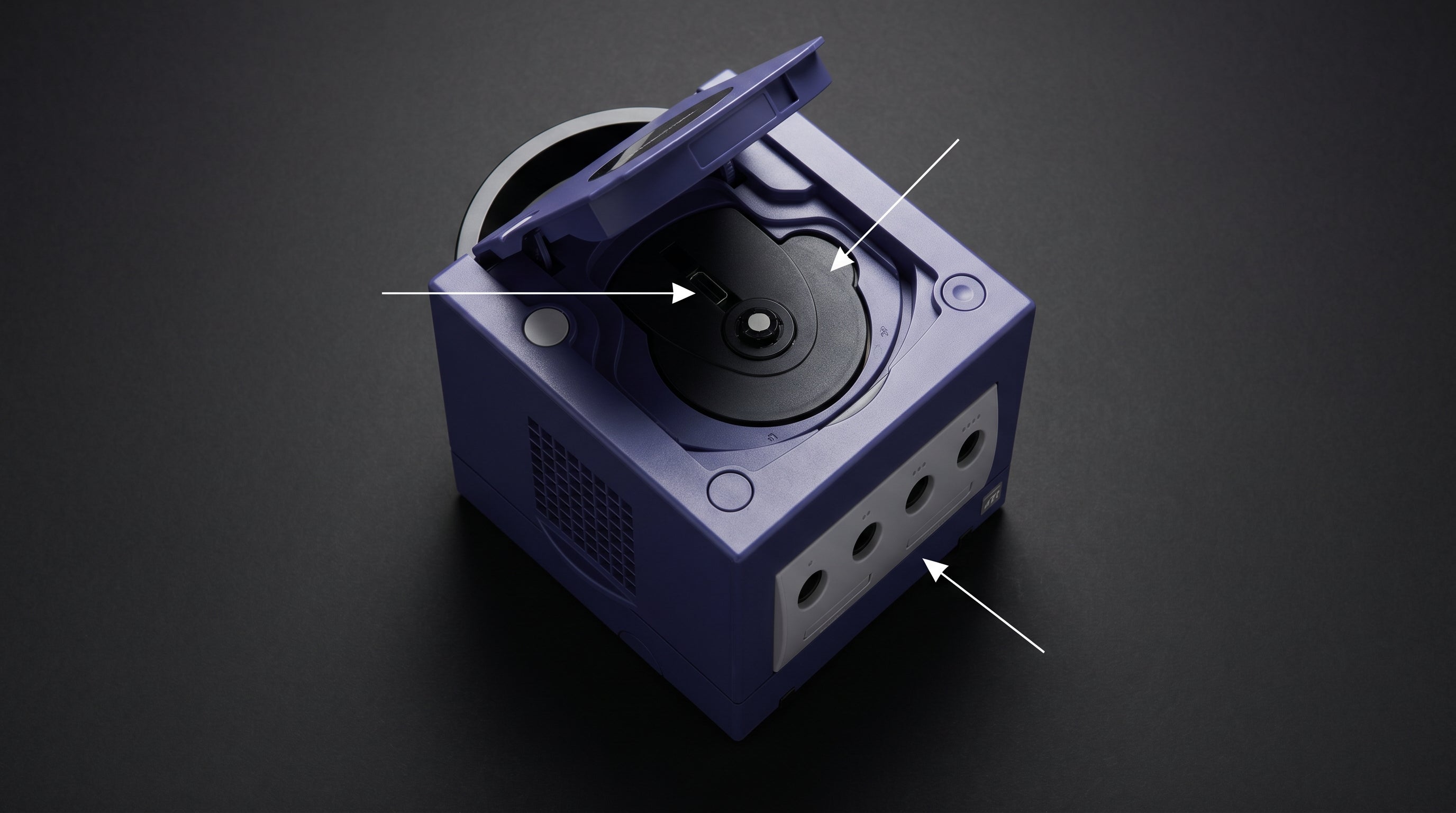
The GameCube shipped in two hardware revisions, and the difference between them matters more than most people realize. DOL-001 has a second video port on the underside of the console. DOL-101 does not. That port is the only way to get component video or a direct HDMI signal out of a GameCube without internal modification. If you care about image quality, you need to know which revision you have before you buy anything.
How to Tell Which Revision You Have
Flip the console over and find the serial number sticker on the bottom. The model number appears at the start of the serial string. It reads either DOL-001 or DOL-101. That is the only definitive way to confirm your revision.
As a rough date reference, Nintendo introduced the DOL-101 from approximately mid-2004 onward, so consoles purchased after that point are more likely to be the later revision. But the sticker is the only reliable check.
You can also look at the underside of the console directly. On a DOL-001, there is a small flip-up flap near the rear edge. Open it and you will see the Digital AV Out port. On a DOL-101, that flap and port are absent.
What the Digital AV Out Actually Carries
The Digital AV Out carries the GameCube's internal Y'CbCr video signal in digital form. This is distinct from the Analog AV Multi Out on the rear, which carries composite, S-Video, and (on PAL hardware) RGB.
The digital port is what makes component video and GCVideo possible. To understand why that distinction matters, it helps to have a baseline on composite, component, and RGB signals and how they differ in quality.
DOL-001 Digital AV Out. Carries the GameCube's internal Y'CbCr digital video signal. Accepts the official Nintendo component cable (DOL-010), Retro-Bit Prism component cable, and GCVideo-compatible adapters including the Carby and Retro-Bit Prism HD.
480p progressive scan. Enabled on DOL-001 via the Digital AV Out. Games that support it prompt you on boot to press A for progressive mode. This is the native high-quality output mode for GameCube software.
DOL-001 Video Options
With the Digital AV Out available, DOL-001 owners have two main high-quality paths.
The first is component video via the official Nintendo DOL-010 cable or a compatible third-party cable like the Retro-Bit Prism. These cables contain an active DAC chip that converts the GameCube's digital Y'CbCr signal to analog YPbPr on three RCA connectors. The cable is not passive. It does actual digital-to-analog conversion internally.
The second path is a GCVideo adapter (Carby, Retro-Bit Prism HD). These adapters also plug into the Digital AV Out port but skip the analog conversion step entirely. They output HDMI directly from the digital source signal. For a full breakdown of GameCube HDMI adapter options and how they compare, see the GameCube HDMI options guide.
DOL-101 Limitations
Without the Digital AV Out, the DOL-101 is limited to the Analog Multi Out on the rear. What that means depends on your region.
| Signal | NTSC GameCube | PAL GameCube |
|---|---|---|
| Composite | Yes | Yes |
| S-Video | Yes | No |
| RGB | No | Yes |
| YPbPr (component) | No — Digital AV Out required | No — Digital AV Out required |
| 480p progressive scan | No — DOL-001 only | No — DOL-001 only |
One point worth clarifying directly: NTSC GameCubes do not output RGB through the Multi-AV connector. This is a common misconception. The Multi-AV carries RGB on PAL hardware only. On NTSC hardware, S-Video is the best signal available through that port without the Digital AV Out. S-Video is a meaningful step up from composite, but it falls well short of component or RGB.
The DOL-101 also cannot output 480p progressive scan. The 54MHz clock connection required for progressive mode is not present on this revision. All DOL-101 output is interlaced.
DOL-101 Upgrade Options
If you have a DOL-101 and want the Digital AV Out, two approaches exist.
The first is the BlackDog Tech DOL-101 Digital Port Kit. This kit physically adds the Digital AV Out port to a DOL-101 via soldering. Once installed, the console behaves like a DOL-001 for video output purposes and can use component cables and GCVideo adapters. This is a targeted, reversible modification focused specifically on the video output port.
The second path is a full internal board modification. Options like GCDual and PicoPAD install inside the console and work on both DOL-001 and DOL-101. These are more involved installations but deliver direct HDMI output without any external adapter.
For most people with a DOL-101, buying a DOL-001 instead is often simpler than sourcing and installing a modification kit. DOL-001 units are not rare, and a working one in reasonable cosmetic condition is usually available without a premium.
Which Revision to Buy
If you are shopping for a GameCube and plan to use it on a modern display, buy a DOL-001. The Digital AV Out port gives you access to component video and direct HDMI adapters. It supports 480p. It does not cost significantly more than a DOL-101.
The DOL-101 is not defective hardware. If you already own one and only plan to use composite or S-Video (NTSC) or RGB SCART (PAL), it will serve you fine. But for anyone starting fresh or specifically shopping for the best video quality, DOL-001 is the right answer.
Electron Shepherd Products for GameCube
If you have a DOL-001 and are using a component cable (the Nintendo DOL-010 or a compatible third-party cable), the ElectronAnalog accepts the YPbPr component signal from that cable and converts it to HDMI. It handles 480p input correctly and adds under 1ms of latency. It is a straightforward, compact solution for the component-to-HDMI step in the signal chain.
-
1
DOL-001 Digital AV Out carries the GameCube's internal Y'CbCr digital video signal.
-
2
Component cable (DOL-010 or Prism) converts that digital signal to analog YPbPr via an internal DAC chip.
-
3
ElectronAnalog accepts the YPbPr RCA output and converts it to HDMI with under 1ms of latency.
This path requires a DOL-001. A DOL-101 cannot use component cables without the BlackDog Digital Port Kit modification.
For capture card setups using the Multi-AV output on either revision, the ElectronNMB splits the Nintendo Multiout signal so you can run composite or S-Video to both a display and a capture card simultaneously. It passes the signal through unmodified.
If you have a DOL-001 and a component cable, the ElectronAnalog handles the last step: converting the YPbPr signal to HDMI cleanly and with minimal latency.
View ElectronAnalog GameCube HDMI options
Share:
240p in Retro Gaming: Why Your Games Flicker on Modern TVs
Best Original Xbox HDMI Adapters in 2026: An Engineer's Honest Comparison